
Live on iPhone · Android beta
Questmeister
A quest a day, and a reason to finish it.
Questmeister gives you one quest a day: small enough to finish, specific enough to start.
Not a habit tracker that waits for you to log something, and not a to-do list that grows faster than you clear it.
Challenges are the social half. Take one on with friends, and everyone gets the same quest on the same day — the comparison is what makes you do it.
Streaks are forgiving by design. A missed day is a missed day, not a punishment, and there is no countdown timer trying to panic you into opening the app.
Get it
iPhone & iPad
Out now on the App Store — a normal download, no TestFlight needed.
Download free (opens in a new tab)Android
Google needs two steps for a closed test, and they have to be done in this order — the Play page checks your group membership before it will let you in.
-
1 · Join the Google Group (opens in a new tab) Use the same Google account that's signed in on your phone.
The group page looks broken. It isn't. It opens on “You don't have permission to access this content” — that message is about reading the group's posts, not about joining, so ignore it. First tap Sign in at the top right. Once you're signed in, a Join group button appears next to the group name — that's the one you want.
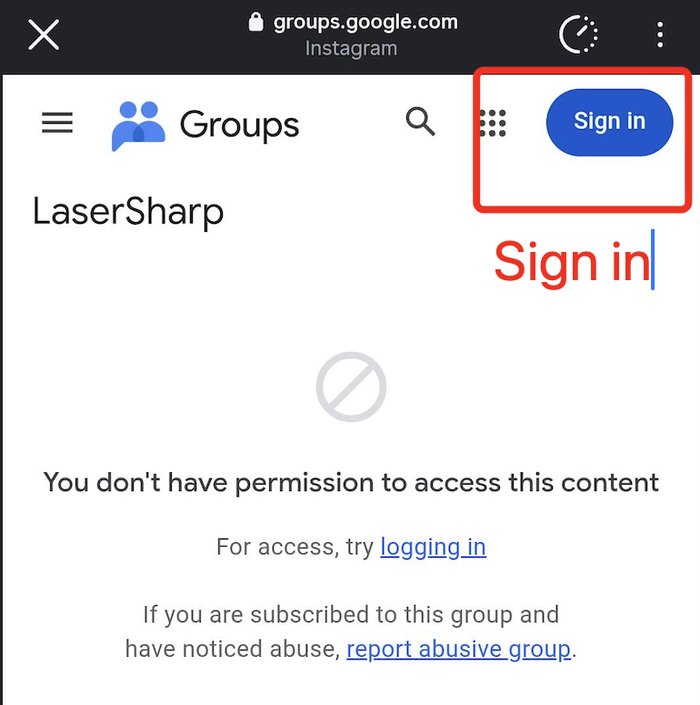
First: signed out — there is no Join button yet. Tap Sign in. Opening the link in Chrome rather than an app’s built-in browser makes this easier. Every one of our groups looks like this — only the name differs. 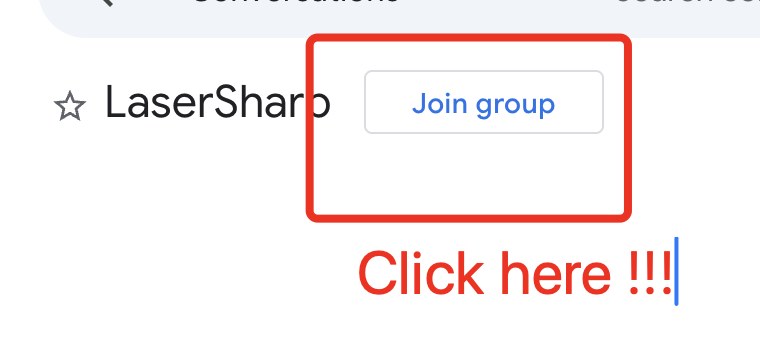
Then: tap Join group next to the name. - 2 · Open Google Play (opens in a new tab) Tap Become a tester, then Download it on Google Play. If it still refuses, give the group a few minutes and reload.